Favorites Screen & Now panel
A concise visual guide to the Windguru+ main dashboard: prototype sketch breakdown, edit mode, spot management, and the minimal compass blueprint.
1 Favorites Screen: the Now panel
Each spot card presents current hour forecast in a "Now" panel, a clean two-tier layout:
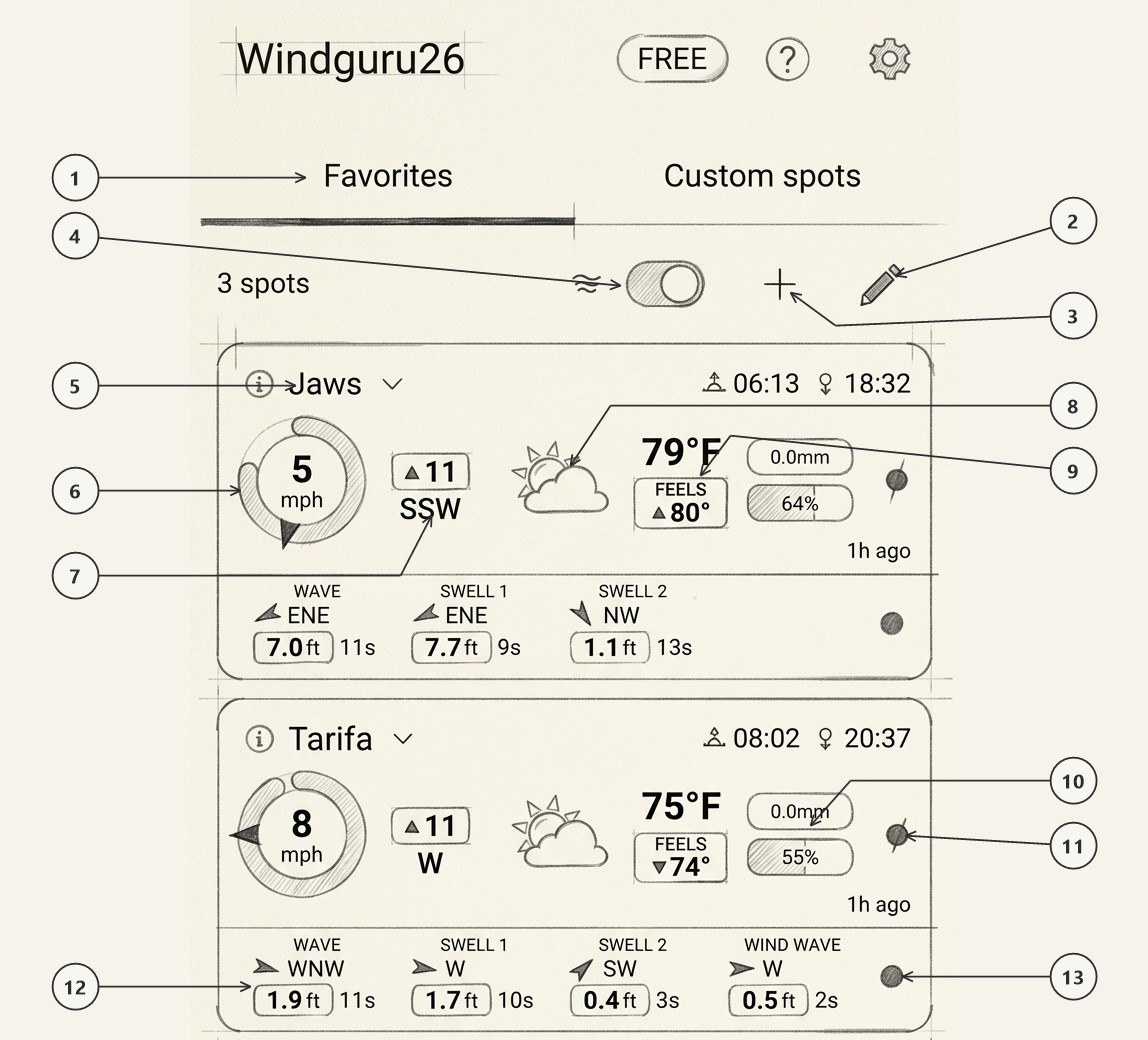
Tabs & View Navigation
Toggle between your saved Favorites list (with active underline indicator) and your synchronized Custom spots list.
Pencil Icon (Edit Mode)
Tap the pencil icon on the top list bar to enter edit mode for quick drag-and-drop spot reordering and spot removal (see Section 2).
Plus Sign (+ Add Spot)
Tap the + button in the top list bar to open the global discovery screen and search or browse new locations (see Section 3).
Wave Toggle Switch
One-tap switch in the top list bar to show or hide maritime sea and swell rows across all spot cards (see Section 4).
Spot Header & Solar Times
Displays spot title (e.g. Jaws), spot info shortcut (ℹ), dropdown chevron, and precise local sunrise (06:13) and sunset (18:32) times.
Radial Compass Dial
Shows sustained wind speed in the central hub (e.g. 5 mph), the directional pointer needle pointing in the true compass heading, and the dynamic outer gust arc sweeping clockwise around the perimeter.
Attached Gust Box
Positioned immediately adjacent to the compass ring, displaying the peak gust speed badge (▲ 11) on top and the cardinal wind heading text (SSW) beneath.
Weather Condition Icon
Depicts daytime or nighttime conditions, sunshine, cloud levels, and precipitation state (e.g. sun behind fair-weather cumulus cloud).
Detail Area: Stacked Temperature
Displays ambient air temperature on top (79°F) paired directly over the colored apparent "FEELS" temperature badge (FEELS ▲ 80°).
Detail Area: Rain & Cloud Chips
Compact vertical chips (shown on the Tarifa panel) displaying forecast precipitation accumulation in millimeters (0.0mm) on top and cloud cover percentage (55%) below.
Detail Area: Wind Consensus Dot
Color-coded agreement indicator pinned to the right of the rain/cloud chips (shown on Tarifa; active when model is "Blended"). Tapping it opens the multi-model wind forecast breakdown.
Wave Area: Maritime Sea & Swell Rows
Lower tier (shown on the Tarifa panel) presenting complete maritime parameter columns (WAVE, SWELL 1, SWELL 2, WIND WAVE) with directional travel arrows (WNW, W, SW), height badges (1.9 ft, 1.7 ft, 0.4 ft, 0.5 ft), and wave periods.
Wave Area: Wave Consensus Dot
Color-coded wave agreement dot pinned to the far right of the wave row (shown on Tarifa; active when model is "Blended"). Tapping it opens the multi-model ocean wave comparison.
2 Edit Mode: Organize in Seconds
Organizing your spot list in Windguru+ is straightforward:
- Enter Edit Mode: Tap the pencil icon 2 in the top list bar.
- Drag to Reorder: Touch the drag handle (☰) on the left of any spot card and move it up or down. As you approach the top or bottom of the screen, the list auto-scrolls smoothly.
- Delete a Spot: Tap the red trash can icon on the right edge of the card.
- Save or Cancel: Tap the green Checkmark (✓) to save the new order, or the red (✕) to cancel and revert immediately.
3 Adding Spots & The Custom Spots Rule
Tap the + (Add) button 3 in the top list bar to open the discovery screen:
- Browse World: Hierarchical tree navigation: Continent → Country → Region → Spots checklist.
- Search: Type at least 3 characters to search the global database by name with instant checkable results.
Windguru+ is a reader for custom spots, not a creator. Custom spots must be created on the windguru.cz website (specifying custom GPS coordinates and models). Once saved online, they automatically appear on your app's Custom spots tab when signed into your account.
4 Wave Toggle & Wave Row Reading
The wave switch 4 in the top list bar allows you to show or hide wave data across all spots with a single tap:
- OFF: Hides the wave row completely, reducing spot card height by ~35% so you can view more spots without scrolling (ideal for inland lakes or paragliding).
- ON: Displays total wave height, swell 1, swell 2, wind wave, and swell periods for coastal spots.
Each wave column in the wave row is systematically organized:
- Wave Columns 12: Lower maritime tier presenting component columns (
WAVEfor primary sea,SWELL 1,SWELL 2, orWIND WAVE). - Wave Arrow & Direction: Directional arrow indicating where waves are heading, alongside the compass heading (e.g.
WNW,W,SW). - Wave Height in the Box: Significant height enclosed in a rounded badge (e.g.
1.9 ft,1.7 ft). - Period: Swell period in seconds placed right beside the height box (e.g.
11s,10s,3s). - Wave Consensus Dot 13: Pinned to the far-right edge of the wave row, functioning like the wind consensus dot above it. Tapping it opens the Wave Consensus model comparison.
5 Consensus Wind & Wave Breakdown
Tapping the colored consensus dot on the right edge of either the wind row or the wave row expands a detailed per-model comparison panel. Tapping the dot or anywhere on the open panel collapses it.
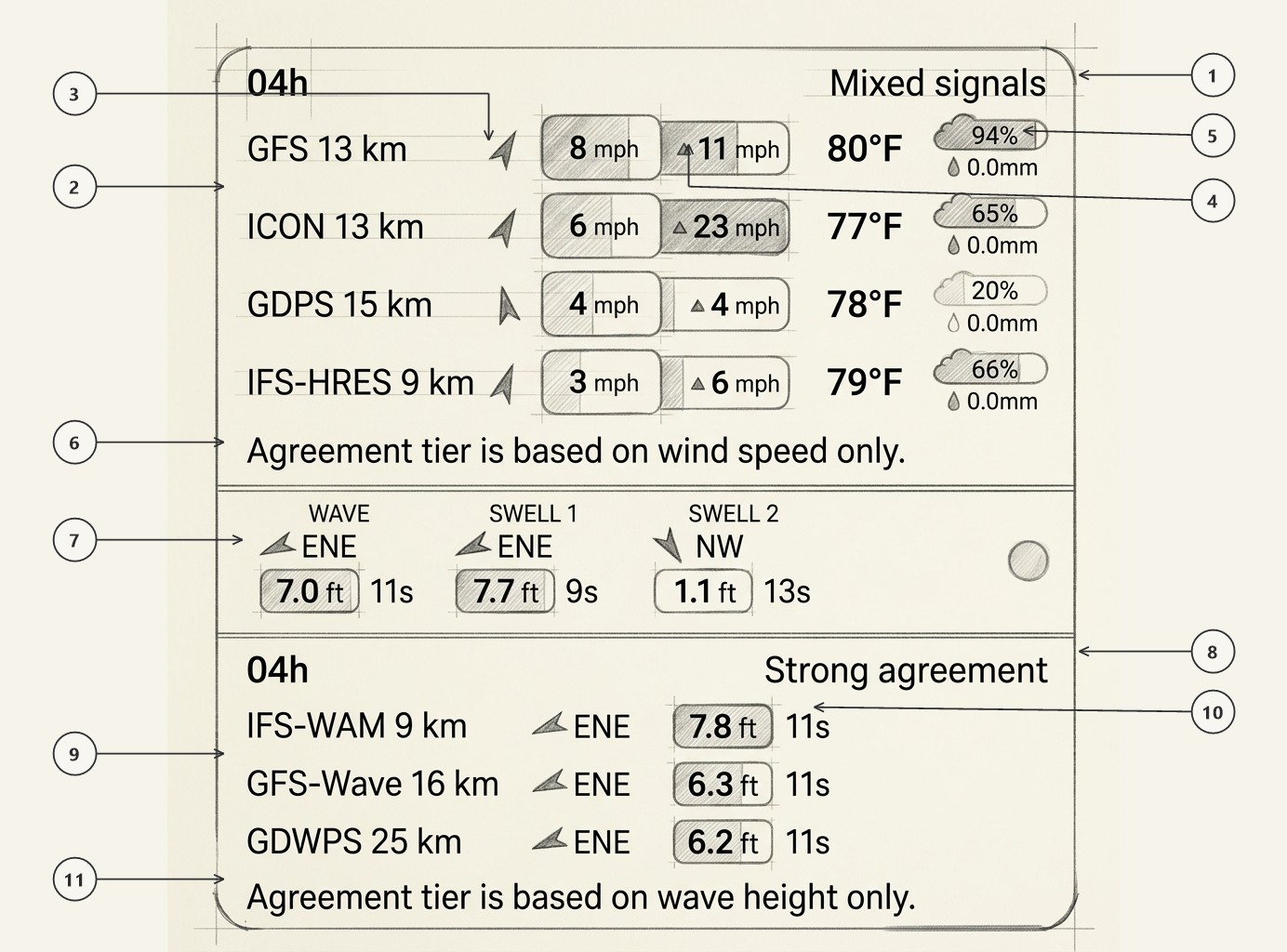
Forecast Hour & Wind Consensus Status
Displays the valid forecast hour (04h) alongside the consensus agreement tier (Mixed signals, Strong agreement, or Models diverging).
Blended wind forecast models
Lists weather models used to compute the blended forecast and consensus dot color.
Wind Direction Arrow
Navigation arrow rotated to the individual model's predicted wind bearing (e.g., SSW).
Sustained Wind & Peak Gust Badges
Model-specific sustained wind speed badge (8 mph) paired with its companion peak gust badge (▲ 11 mph).
Temperature & Rain/Cloud Chips
Predicted 2-meter air temperature (80°F) alongside cloud cover percentage (94%) and precipitation amount (0.0mm).
Wind Agreement Footnote
Clarifies the scientific calculation rule: the wind agreement tier is calculated strictly from the spread in sustained wind speeds across models.
Wave Summary Row
The spot's maritime conditions (WAVE 7.0 ft 11s, SWELL 1 7.7 ft 9s, SWELL 2 1.1 ft 13s) and the wave consensus dot on the far right.
Wave Agreement Header
Valid hour (04h) and wave consensus status (Strong agreement) computed across reporting wave models.
Blended wave forecast models
Lists wave models used to compute the blended forecast and consensus dot color.
Model Wave Height & Swell Period
Individual model predicted significant wave height badge (7.8 ft) and primary swell period (11s).
Wave Agreement Footnote
Scientific rule reminder: wave agreement tiers are calculated strictly from the spread in significant wave height across models.
6 The Compass Blueprint Reading
The compass instrument is built around four essential elements: the wind circle, the gust disk, the pointer needle, and the gust box.
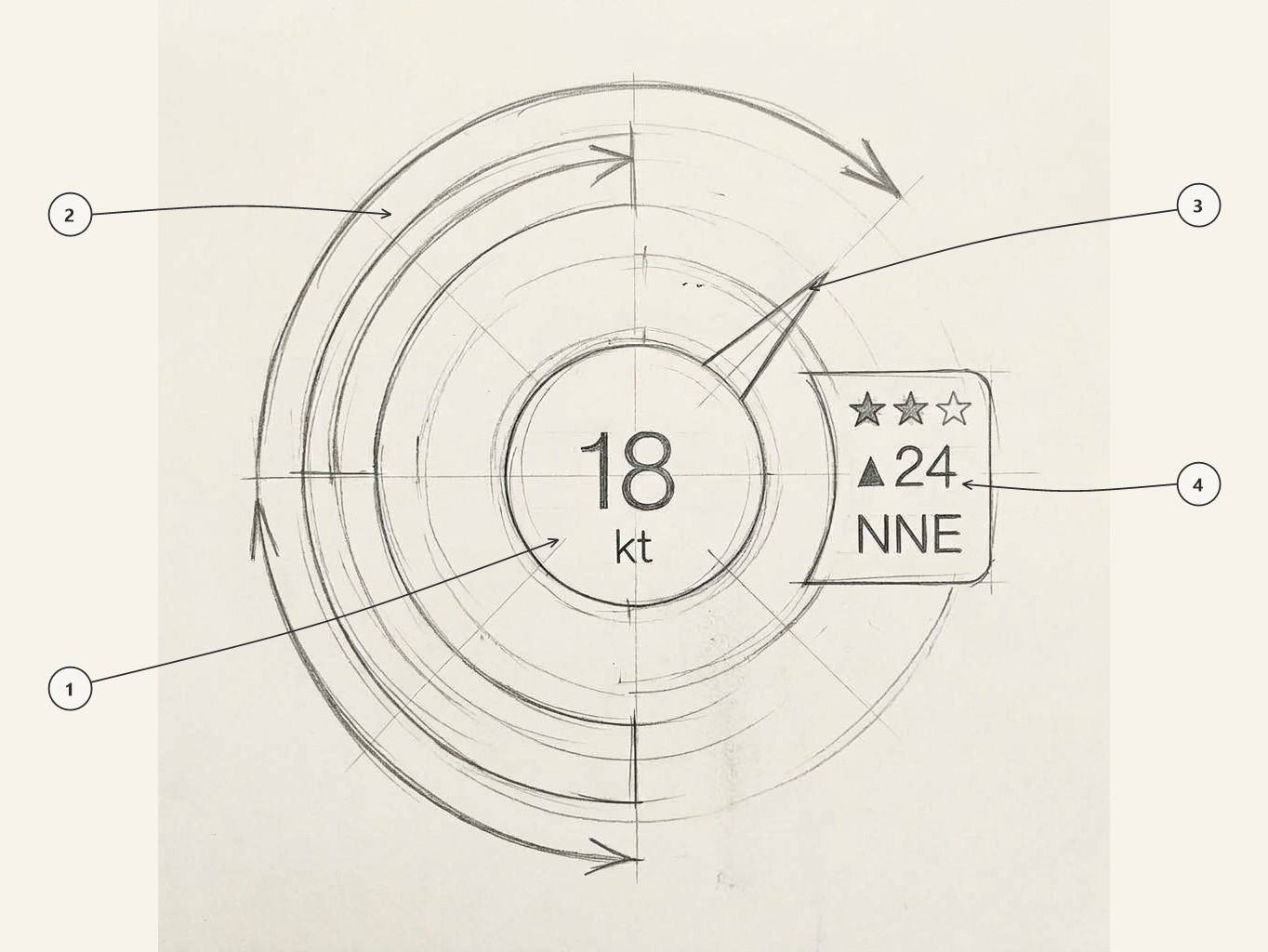
Wind Circle Hub & Unit
Inner circular disk showing sustained wind speed (e.g. 18) and unit (kt), colored by the Windguru palette.
Outer Gust Disk Arc
Outer perimeter arc sweeping clockwise from the top (12 o'clock), visually representing the gust envelope.
Directional Pointer Needle
Analog needle pointing in the direction the wind is blowing towards (e.g. NNE), with smooth spring damping.
Gust Box (Stars, Gust, Direction)
Shows Windguru star rating (1–3 stars), peak gust badge (▲ 24), and cardinal direction label (NNE).
7 Dynamic Gust Ring Scale
The gust ring visually displays the gust speed on a continuous radial scale from 0 up to the maximum forecasted gust of the day. As the gust approaches the day's peak, the arc sweeps further clockwise around the perimeter—providing an immediate visual indicator of how powerful the current gust is relative to the day's peak potential.
When the gust arc completes a full 360° circle, it signals that the selected hour is experiencing the absolute maximum gust forecasted for that entire day.
8 Windguru Stars Range
The classic Windguru star rating reflects planing conditions for windsurfing and kitesurfing based on wind speed:
| Wind Speed Range | Rating | Star Color | Condition Profile |
|---|---|---|---|
| Below 11 knots | — | None | Non-planing conditions (light winds, foil, SUP) |
| 11.0 to 14.9 knots | ★ | Warm Orange | Light planing breeze (large sails & kites) |
| 15.0 to 18.9 knots | ★★ | Warm Orange | Solid powered planing session (standard gear) |
| 19.0 knots and above | ★★★ | Warm Orange | High wind planing (small sails, storm riders) |
| Air temperature ≤ 0°C (32°F) | ★ / ★★ / ★★★ | Cold Blue | Freezing condition warning (hypothermia risk) |