The Timeline Forecast View
1 Overview
The Timeline forecast screen starts at the top with a Now panel presenting the spot's current-hour conditions (described in detail in Chapter 3: Favorites Screen & Now panel).
Beneath the top controls, the Timeline view delivers an hourly, chronological card stream providing instantaneous reading of changing winds, gusts, temperatures, and ocean waves.
The architecture of the Timeline screen is designed around complete visual consistency: every hourly card adopts the exact same visual hierarchy and data grammar as the Now panel at the top, allowing your eyes to scan down the page effortlessly.
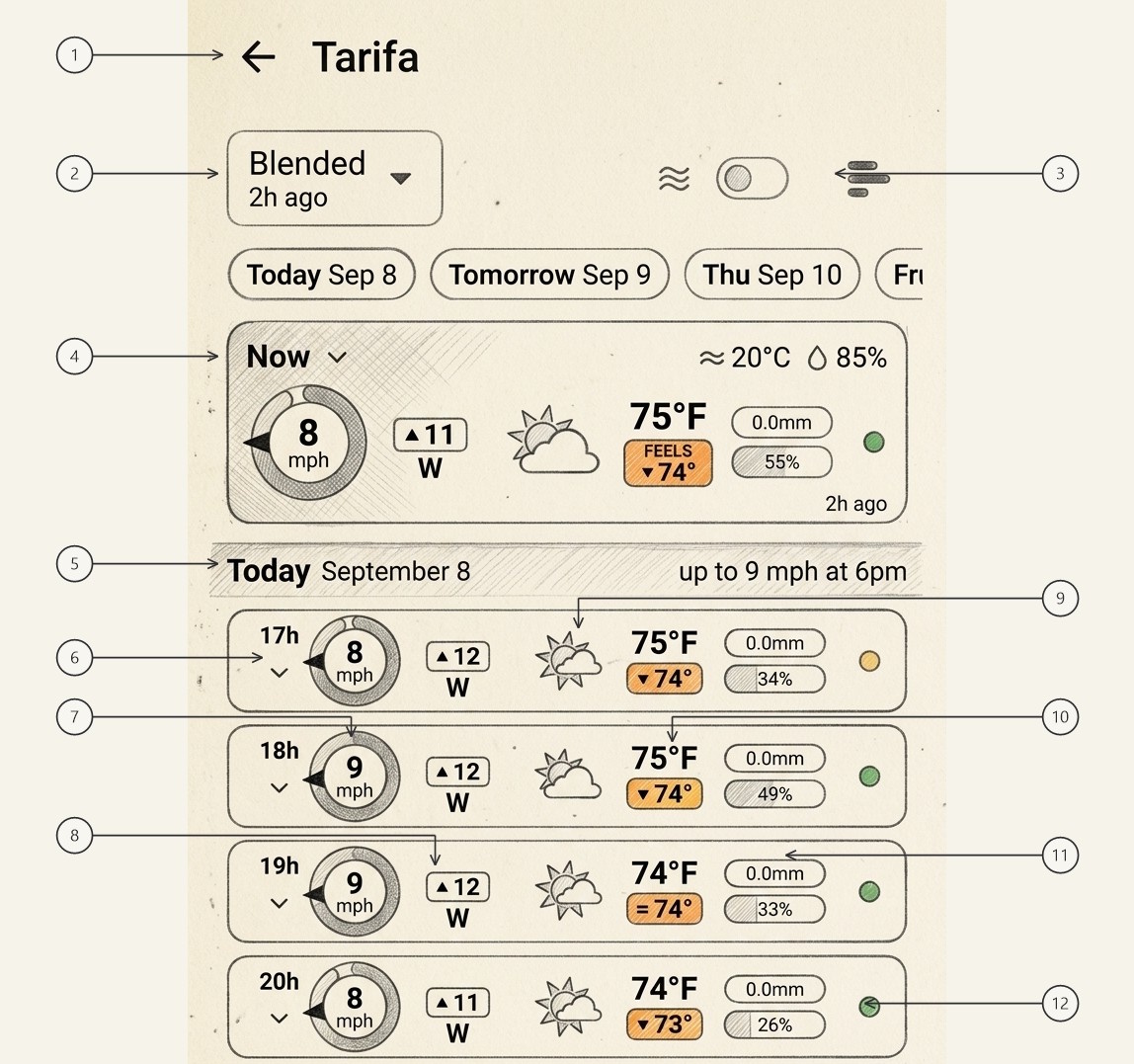
Back Navigation & Spot Title
Displays a back navigation arrow (←) returning directly to your Favorites or Custom Spots list, alongside the spot name (e.g. Tarifa).
Model Selector Dropdown
Active weather model button defaulting to Blended ▾ with initialization time (e.g. 2h ago). Tap to choose either the blended ensemble or a single numerical model (GFS, ICON, IFS-HRES, GDPS, or wave models).
Wave Toggle & View Mode Switcher
Top right action cluster: wave toggle switch (≈ [• ]) turning sea and swell rows ON or OFF across the entire timeline feed, and view mode switcher (≡) for 1-tap switching between Timeline, Meteogram, Classic Grid, and Map Forecast.
Current-Hour "Now" Panel
Anchor card displaying the spot's immediate conditions (air temperature, humidity, sea temp). Detailed fully in Chapter 3.
Day Header & Daily Maximum Highlights
High-contrast date divider (e.g. Today September 8) paired with the day's peak highlight (e.g. up to 9 mph at 6pm), allowing instant session planning.
Hourly Time Tag & Chevron
The valid forecast hour (e.g. 17h) and expansion chevron (▾). Tapping anywhere on the hourly card expands additional granular weather parameters.
Radial Compass Dial & Gust Arc
Scaled directional compass showing sustained wind speed (e.g. 9 mph), pointing needle, and outer swept gust envelope.
Attached Gust Badge & Wind Direction
Dedicated gust speed badge (e.g. ▲ 12) directly over cardinal heading text (W), identical to the Now panel format.
Hourly Weather Condition Icon
Weather glyph portraying sky cover, sun elevation, and precipitation state for that specific hourly step (e.g. sun behind cumulus cloud).
Detail Area: Temperature Stack
Ambient air temperature reading (75°F) stacked directly above the apparent feels-like badge (FEELS ▼ 74°).
Detail Area: Precipitation & Cloud Chips
Compact chips showing forecasted liquid precipitation accumulation (0.0mm) above total cloud cover percentage (34%).
Hourly Model Consensus Dot
Multi-model agreement indicator pinned to the right edge (active when "Blended" is selected). Tap to inspect individual model runs.
When the wave toggle (3) is ON, every hourly card also carries an integrated wave row showing the WAVE, SWELL 1, SWELL 2, and WIND WAVE columns with headings, height boxes, and swell periods.
2 Consensus Dots & The "Blended" Interactive Rule
One of Windguru+'s most powerful capabilities is the interactive Consensus Dot (12) pinned to the right of the stacked rain/cloud chips in the wind row, and on the far-right edge of the wave row.
Consensus dots are active and colored only when the forecast model selector (2) is set to "Blended".
- When "Blended" is selected: The dot color (green, orange, red) indicates the multi-model agreement for that hour, evaluating both wind speed and compass bearing simultaneously so you are never caught off guard by a sudden directional shift (see Chapter 1, Section 4 for details). Tapping the consensus dot expands the live Model Breakdown Sheet, revealing individual predictions from each supercomputer (e.g. AROME, ECMWF, GFS, ICON) side-by-side.
- When a single model is selected (e.g. GFS or ICON): There is no consensus calculation to display because the screen presents data exclusively from that chosen numerical run. Consequently, consensus dots are hidden or subdued.
3 Day Headers: Daily Maximum Wind & Wave
Between groups of hourly cards, the feed is organized into distinct day sections via high-contrast separator banners (5, e.g. Today September 8, Tomorrow September 9, Thursday September 10).
Crucially, each day header summarizes the peak weather events of that day right on the right-hand side of the banner:
PEAK Daily Maximum Wind Speed & Time
Highlights the maximum sustained and gust speed of the day along with the exact forecast hour when it will occur (e.g. up to 9 mph at 6pm or up to 14 mph at 4pm). This allows kiteboarders, windsurfers, sailors, and paragliders to identify optimal daily windows at a glance.
SWELL Daily Maximum Wave Height & Period
When the wave toggle (3) is active (ON), the day header also calculates and displays the highest significant sea/swell height expected during daylight hours (e.g. max 7.7 ft at 15h), providing instantaneous maritime safety assessment.