The Classic Forecast View
1 Overview
The Classic forecast screen starts at the top with a Now panel presenting the spot's current-hour conditions (described in detail in Chapter 3: Favorites Screen & Now panel).
The Classic view faithfully reproduces the traditional, high-density tabular forecast table that has been the worldwide benchmark on the windguru.cz website for over two decades. It packs complete meteorological parameters into horizontal color-coded data strips, allowing experienced ocean athletes and meteorologists to scan multiple hours and days in parallel.
Each day is organized in its own distinct table, complete with daily peak maximum indicators, rotated wind arrows, cloud layers, and interactive model consensus dots.
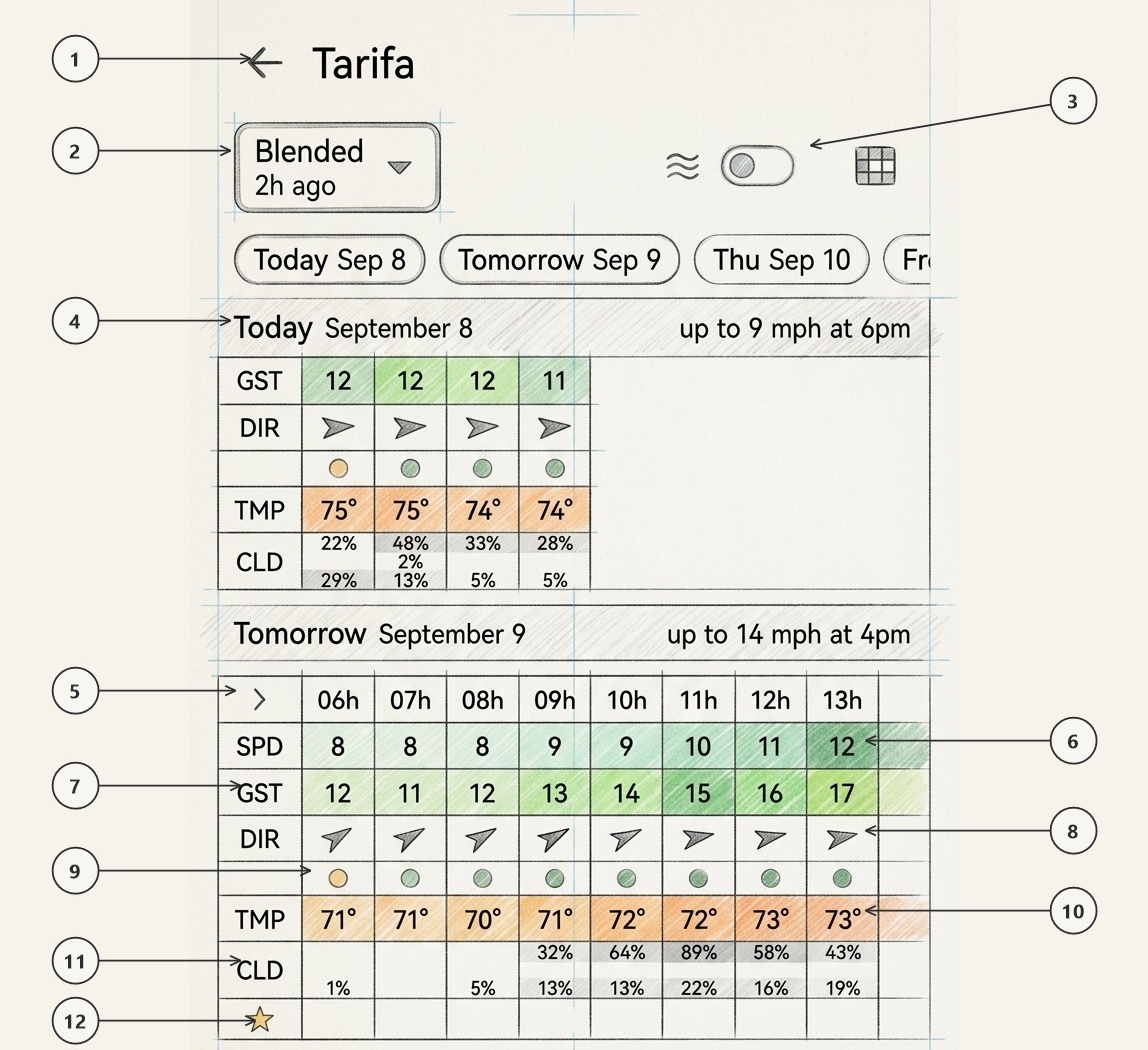
Back Navigation & Spot Title
Top navigation bar showing back arrow (←) returning directly to your spot list, alongside the spot name (e.g. Tarifa).
Model Selector Dropdown
Active weather model button defaulting to Blended ▾ with initialization time (e.g. 2h ago). Tap to choose either the blended ensemble or a single numerical model (GFS 13km, ICON 13km, IFS-HRES 9km, GDPS 15km, etc.).
Wave Toggle & View Mode Switcher
Top right action controls: wave switch (≈ [• ]) turning the wave rows ON or OFF across all daily tables, and grid icon (:::) switching between Classic, Timeline, Meteogram, and Map Forecast.
Day Header & Daily Maximum Highlights
High-contrast date divider (e.g. Tomorrow September 9) paired with the day's peak highlight (e.g. up to 14 mph at 4pm).
Hour Header Row & Expand Chevron
Leading expansion chevron (>) and forecast hour headers (06h, 07h, 08h, 09h, 10h...). Tapping the chevron expands or collapses the full legend.
Sustained Wind Speed Row (SPD)
Base 10-meter sustained wind velocity color-coded with Windguru's official palette according to intensity (e.g. 8, 9, 12 mph).
Peak Wind Gusts Row (GST)
Peak 3-second gust speed expected during each interval (e.g. 12, 14, 17 mph) with distinctive gust color highlights.
Wind Direction Row (DIR)
Rotated navigation arrows indicating the true compass heading towards which the wind is blowing.
Hourly Model Consensus Dot Row
Color-coded agreement dots (active when "Blended" is selected). Tap any dot to view the multi-model breakdown modal.
Ambient Temperature Row (TMP)
Air temperature at 2 meters above surface (e.g. 71°, 72°, 73°) color-coded with warm or cool thermal background tinting.
Cloud Cover Row (CLD)
Total cloud cover broken down into three atmospheric tiers: High (top), Mid (center), and Low (bottom) altitude percentages.
Windguru Stars Row (★)
Windguru's proprietary rating system (★, ★★, ★★★) rating each hour from its wind strength: the stronger the wind, the more stars (see Row Codes).
2 Consensus Dots & The "Blended" Interactive Rule
In the Classic tabular grid, a dedicated row of Consensus Dots (9) sits directly under the wind direction arrows. When the wave toggle (3) is ON, a second dot row sits under the wave direction arrows for the wave models:
Consensus dots are active and colored only when the forecast model selector (2) is set to "Blended".
- When "Blended" is active: The dot color indicates the multi-model agreement for that specific hour across both wind speed and compass bearing simultaneously (Green = Strong agreement, Amber = Mixed signals, Red = Models diverging; see Chapter 1, Section 4). Tapping any consensus dot opens that hour's Model Breakdown Sheet under the table, revealing individual model predictions from each supercomputer (e.g. AROME, ECMWF, GFS, ICON for wind; IFS-WAM, GFS-Wave, GDWPS for waves).
- When a single model is selected (e.g. GFS or ICON): There is no consensus calculation to display because the grid presents values exclusively from that chosen numerical run. The consensus rows are hidden.
3 Day Headers: Daily Maximum Wind & Wave
Each day's forecast grid is introduced by a high-contrast day header banner (4, e.g. Today September 8, Tomorrow September 9, Thursday September 10) summarizing the daily highlights on the right:
PEAK Daily Maximum Wind Speed & Peak Hour
Identifies the peak wind event of the day along with the exact forecast hour when it will peak (e.g. up to 14 mph at 4pm or up to 9 mph at 6pm). This allows fast scanning across upcoming days.
SWELL Daily Maximum Wave Height & Period
When the wave toggle switch (3) is active, the day header simultaneously computes and displays the highest expected significant wave height and swell period for that date (e.g. max 7.7 ft at 15h).
4 Row Codes Reference
The narrow legend column on the left of each daily table labels every row with a short code. Tap the legend column to expand it into the full row names with their units (e.g. Wind speed (kts)); tap it again to collapse it. Rows always appear in the order below, and a row is left out of a day's table when there is no data for it that day.
| Code | Row (expanded label) | What the cells show |
|---|---|---|
| › | Hour | Forecast hour of each column (e.g. 06h, 07h). The chevron points right when the legend is collapsed and left when it is expanded. |
| SPD | Wind speed | Sustained wind speed in your wind unit, each cell colored with the Windguru wind palette. |
| GST | Wind gusts | Gust speed, same unit and palette. Hidden when Preferences → Hide gust speed is on. |
| DIR | Wind direction | Arrow pointing the way the wind is blowing. |
| (empty) | Wind consensus | One colored agreement dot per hour comparing the wind models. This row has no code on purpose: the dots speak for themselves. Tap a dot to open that hour's per-model breakdown. Only shown with Blended; an hour with a single model shows no dot. |
| WAV | Wave | Significant wave height in your wave unit (m or ft, one decimal), colored with the wave palette. Wave toggle ON only. |
| PER | Wave period | Wave period in seconds (e.g. 11s). Longer periods mean more powerful groundswell. Wave toggle ON only. |
| WDIR | Wave direction | Arrow pointing the way the waves are travelling. Wave toggle ON only. |
| (empty) | Wave consensus | The same agreement dots for the wave models (IFS-WAM, GFS-Wave, GDWPS), also without a code. Wave toggle ON and Blended only. |
| TMP | Temperature | Air temperature in °C or °F (e.g. 22°), colored with the temperature palette. |
| CLD | Cloud cover (%) high / mid / low |
Three stacked bands giving the high, mid and low cloud percentages, or a single total band when the model provides no layers. A layer at 0% prints no number. |
| RN1 | Rain (mm/1h) | Rain over 1 hour in mm, one decimal. Empty when dry; light blue, darker blue from 3 mm. |
| RN3 | Rain (mm/3h) | Rain over 3 hours, for models reporting 3-hour totals. Same colors as RN1. |
| ★ | Windguru rating | 1 to 3 stars from the wind speed: 1 star above 11 kt, 2 above 15 kt, 3 above 19 kt. Stars are orange, or blue when the air temperature is below 0 °C. Empty below 11 kt. |